The Windows Backup Software That Backs Up Anything to Anywhere
A Windows app that backs up any source you connect — your PC, a NAS, even another cloud — to any destination you choose. Encrypted, scheduled, versioned, with one-click restore. Your storage, your keys, no lock-in.
- 30-day full-feature trial
- No card required
- 24 destinations
v2026.10.2 Released October 22, 2026 · 37 MB download

A complete backup toolkit. On storage that stays yours.
Scheduling, 24 destinations, AES-256 encryption, compression, notifications and one-click restore, in one focused app. No resold cloud, no per-gigabyte markup, no vendor holding your archives.
Any Storage
A NAS, an SFTP box, an S3 bucket, a self-hosted Nextcloud, or the cloud drive you already pay for. Unlimited accounts per provider, mixed freely across jobs.
Scheduled Backups
Daily, weekly, or a custom interval, with missed-run policies and retention rules. Every job carries its own state, so “is my data safe right now?” is a look, not an investigation.
- Ran clean, next run scheduled
- Delayed, retried or partial
- Failed, and the log says why
Encryption
Applied on your machine before anything uploads. One checkbox, your password, and a key that never leaves the device.
Compression
Zip archives with tunable levels. Trade speed for size per backup, and cut both transfer time and storage cost.
Smart Notifications
Email, Telegram, webhooks, a local script or a tray popup, on success, failure or completion with errors, and when a backup doesn't run at all. Configure once, reuse everywhere.
One-Click Restore
Every run is kept as a restore point with its duration, transferred size and status, and checked the moment it finishes. A failed or interrupted one says so, in plain language.
How restore works- 01Pick a backup
- 02Pick a point in time
- 03Choose where it lands
Ask Claude if your backups ran.
BackupKit now has an MCP server. Claude, Cursor, VS Code and other assistants can check backup health, read run history and see what a backup contains — and, once you allow it, run a job or line up a restore for you to confirm. Your storage passwords never cross over.
- Claude Desktop
- Claude Code
- Cursor
- VS Code
- Windsurf
- Gemini CLI
Did last night's backups all run?
Four of five ran. Photos has failed twice in a row — the NAS share wasn't reachable. Want me to run it again now?
Also included
Any source, not just this PC
The app runs on Windows, but a backup is not limited to leaving it. Anything you connect can be the source, and anything else the destination.
- NASS3 bucket
- DropboxNAS
- SFTPOneDrive
Health Dashboard
Green, amber or red per job. Open it, see that everything is fine, close it.
Activity Log
Every run recorded, filterable to a single job when something needs diagnosing.
Checked after every run
Each backup is checked against the list of files it was written with the moment it finishes. Verify re-checks any backup whenever you ask.
In the tray, and in File Explorer
The tray icon shows your backups' health at a glance. On Windows 11, right-click any folder and choose Create Backup.
Leave things out
Filters skip caches, temporary files, node_modules or anything over a size you set, so backups are smaller and faster.
Not here yet. These ship when they are bulletproof, and not before.
- Incremental backups
- Bandwidth throttling
Your storage. Not ours.
Storage you own
NAS and network shares, SFTP, FTPS, WebDAV, local and external drives, and self-hosted ownCloud, Nextcloud or Seafile (beta).
Object storage, your keys
Amazon S3, Azure Blob, Google Cloud Storage, and S3-compatible providers like Cloudflare R2, Backblaze B2 and Wasabi.
Clouds you already pay for
Google Drive, Dropbox, OneDrive, pCloud, Box and MEGA. Unlimited accounts per provider, mixed freely across jobs.
+8 more. See the full list.
Every destination in one picker
Connect as many as you like, name them, and pick one when you create a backup.
- Unlimited accounts per provider
- Mix destinations freely across jobs
- Connect once, reuse on every backup

Install it your way
Install from the command line
The package manager downloads the same signed installer and checks its SHA-256 before it runs.
choco install backupkit
On the Microsoft Store
Passed Microsoft's Store certification before it was listed, and installs from the Store app.

Direct download
The signed installer from this site, with its SHA-256 published so you can check it.
Explore all featuresBackup anything, anywhere. On autopilot.
Scheduled, encrypted, compressed — from any storage you connect to any other.
Set Your Backups on Autopilot
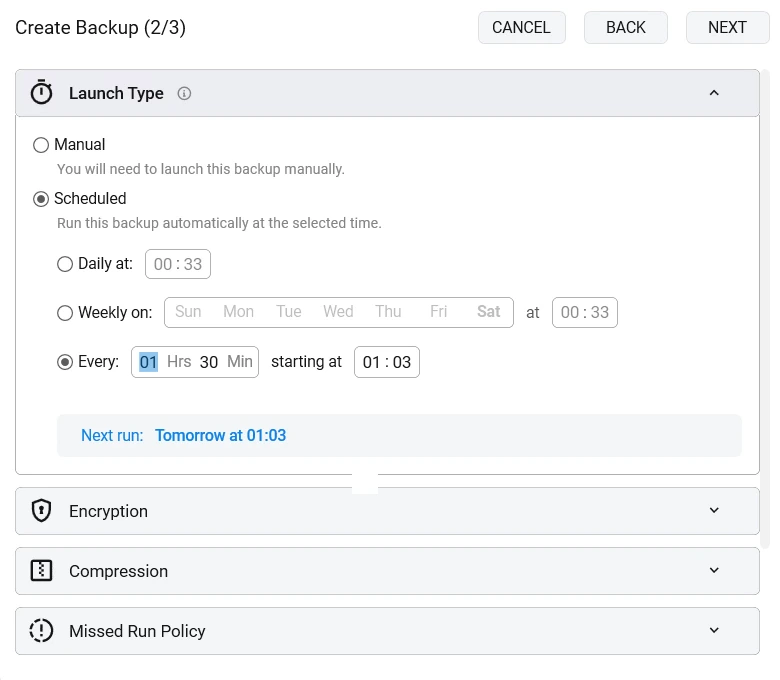
Pick a source, pick a destination, set the schedule. BackupKit quietly runs in the background — and tells you if something ever goes wrong.
- Daily, weekly, or custom interval schedules
- Missed-run policy and retention rules built in
- Pause and resume anytime without losing your settings
Getting it back is the part that matters
A backup you cannot restore is a folder you are paying to store. Pick a backup, pick a point in time, choose where it lands — BackupKit downloads, decrypts and unpacks it for you.
- Every run kept as a restore point, with duration, size and status
- One-click restore of any version — pick it, and the backup is back
- A failed or interrupted run says so, in plain language
And if BackupKit ever disappears, your data does not. Archives are standard AES-encrypted zips — any tool that opens an encrypted zip can get your files back, with or without us.
How restore works
You pay for the app. Not for storage.
Hosted services bundle storage into the price and rent it back to you every month. BackupKit does not include any — it writes to the NAS, bucket or cloud drive you already have, so you are not paying twice for the same gigabytes.
Every feature is in every plan. Only the billing differs.
Every plan includes
- Scheduled & auto backups
- 24 storage destinations
- AES-256 encryption
- One-click restore
- Email support, direct to the developer
- 3 personal devices
Monthly
Pay as you go
Billed monthly · cancel anytime
Choose Monthly30-day free trial first · cancel anytime
Yearly
Best for set-and-forget
~$4.08/month · 32% cheaper than monthly
Choose Yearly30-day free trial first · billed once a year
Lifetime
One-time payment, yours to keep
+ 2 years of free updates · yours forever
Buy LifetimeOne-time payment · 30-day money-back guarantee
Every plan includes every feature — only the billing differs.
See full pricing details & FAQFrequently Asked Questions
Quick answers to common questions
One click. Pick the backup and the version you want, choose a restore location, and BackupKit downloads, decrypts, and unpacks everything for you. On a new PC, point a new backup at the folder that holds your backups and BackupKit adopts their history, ready to restore. Because your archives are standard encrypted zips, you can also restore manually with any tool that handles AES-zip — no vendor lock-in.
Your backups are gone. We cannot reset it, recover it, or help you get in — the password never leaves your machine, so there is nothing on our side to unlock. That is the trade for a destination that can never open your files. Store it in a password manager before your first encrypted backup, not after.
They keep working. Archives are standard AES-encrypted zip files on storage you already control, so 7-Zip, WinRAR, PeaZip or any other archive tool opens them with your password, today, with BackupKit uninstalled. A plain-text HOW-TO-RESTORE.txt in your backup folder spells out the steps. No proprietary format, no vendor in the middle of your restore, and nothing to migrate if you leave.
No — BackupKit is a paid product with a 30-day full-feature free trial. Every feature is unlocked during the trial so you can set up real backups and verify they work end-to-end before paying. Backups are infrastructure, and a crippled free tier would misrepresent what the product does.
BackupKit supports 24 destinations: FTP, FTPS, SFTP, WebDAV, Google Drive, Dropbox, OneDrive, pCloud, Box, MEGA, ownCloud, Nextcloud and Seafile (beta), plus local and network drives, and object storage — Amazon S3, Azure Blob, Google Cloud Storage and any S3-compatible provider such as Cloudflare R2, Backblaze B2, Wasabi and DigitalOcean Spaces. You can connect unlimited accounts per provider and mix destinations across backup jobs.
Tick one box and the backup is encrypted with AES-256 on your machine, before upload — there is no algorithm to choose and no weaker mode to land on by accident. Only you hold the password: it is stored under Windows DPAPI, never sent to us, and restoring an encrypted backup asks for it. Transport uses secure protocols (FTPS, SFTP, HTTPS).
Run backups daily, weekly on specific days, at custom intervals (hours/days/weeks), or strictly manually. If your PC was off at scheduled time, you choose what happens: skip, run immediately when it comes back online, or wait for the next slot. Retention policies auto-clean old versions by age or count.
Yes — the health dashboard and the tray icon show green/yellow/red status per job at a glance, and you can configure notifications on success, failure, or completion with errors via email, Telegram, webhooks, local scripts, or in-app tray popups. Set up an integration once, enable it per backup. BackupKit also tells you when a backup doesn't run at all: late, missed while the PC was off, or stuck. An optional heartbeat to a service like healthchecks.io covers the times BackupKit itself isn't running.
BackupKit is a Windows-native desktop app with a pixel-perfect UI in both dark and light themes. It runs on Windows 10 and 11. You can of course back up to any platform — including Linux servers over SFTP, NAS devices, or any of the supported clouds.
A one-time purchase that gives you:
- Lifetime access to BackupKit with all current features
- 2 years of free updates and security patches
- Continued use of your version forever after updates expire
- 50% off update renewals after your 2-year period ends
We offer a 30-day money-back guarantee on all purchases. If BackupKit doesn’t meet your needs, request a refund within 30 days for a full refund. Subscriptions can be canceled anytime.
Set it up once. Forget it on purpose.
Point BackupKit at what matters and at storage you already own. It runs on its own, tells you if anything breaks, and hands everything back in one click when you need it.
30-day full trial · no card required · Windows 10 & 11
Questions go straight to the developer who built it — no ticket queue, no first-line script.
Rather check than trust? The installer’s SHA-256 and signing certificate are published, your archives are standard AES zips any tool can open, and what we don’t claim is written down.
Latest from the blog
What changed in each release, and guides to backing up Windows to storage you own.
BackupKit 2026.10.2: Every Backup Checked, and an Alert When One Doesn't Run
Most of October went into one question: when BackupKit says a backup worked, is it true? Every run is now checked when it finishes, you hear about a backup that didn't happen, filters leave out what you never need back, and restores are safer.
7 min read
What's New in BackupKit: Simpler Encryption, Ten Themes and an MCP Server
Three releases since the first public build in August. Encryption got simpler and stricter, running backups can be stopped, there are ten themes, and your AI assistant can now tell you whether last night's backups ran. Next up: winget, Chocolatey and the Microsoft Store.
6 min read
The Best Backup Software for Windows in 2026, Honestly Compared
Eight Windows backup tools grouped by the job they're actually best at — file backup, disk imaging, hosted cloud, open-source — with real pricing and the trade-offs vendors don't lead with.
8 min read