A backup you never hear about is a backup you can't trust. BackupKit tells you when a run succeeds, fails, or finishes with some files behind, and when a backup that should have run didn't — through whatever channel you already watch — and stays quiet the rest of the time. Set the channels up once, then flip any combination on or off per backup job.
Five ways to get notified
Point BackupKit at any SMTP server — Gmail, your company mail, a transactional provider like Postmark. Templated subject and body per event type.
Create a bot, paste the token and chat ID, done. Ping your phone or a private group when something needs attention.
POST a configurable JSON payload to any URL. Route into Slack, Discord, PagerDuty, n8n, Zapier, your own homelab dashboard — anywhere.
Launch any executable or batch script on a backup event — sync to a second destination, fire a PowerShell command, kick a CI job. With configurable arguments.
A custom popup near your Windows tray — subtle, doesn't stack up, doesn't trip Focus Assist. Unlike Windows toasts, BackupKit owns the UI.
Missing a channel? Tell us — new integrations get prioritized by request count.

Trigger on the events that matter
Every integration can fire on any combination of three events. Telegram on failures but email on successes? Webhooks on everything? Silent unless something breaks? Mix however you want.
- On success: run completed, files arrived. Usually silent unless you want the reassurance.
- Completed with errors: the run finished, but some files didn't make it. A dropped connection partway through a large set is the usual cause — often the most useful signal, because nothing looks broken from the outside.
- On failure: transfer error, auth issue, disk full. The one you almost always want on.
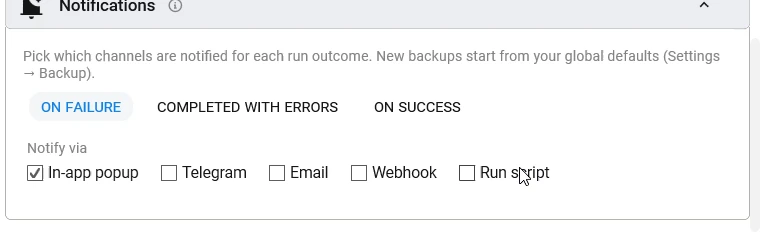

When a backup doesn't run
Those three events all come from a backup that ran. The failure that matters most sends nothing at all: a backup that quietly stopped running. So BackupKit also watches every scheduled backup, and tells you on the channels you pick in Settings > Monitoring when one doesn't run:
- Late: its time came and went while BackupKit was running. You choose how late counts as late, from 15 minutes to 6 hours.
- Missed: its time passed while BackupKit or the PC was off. You hear about it when BackupKit starts again, and the backup's missed-run setting decides whether it runs now.
- Stuck: a running backup has made no progress for a while. BackupKit stops it, as its Stop button would, so it no longer holds up the next run.
And for the one case no app can report on itself, BackupKit closed or the PC off, there is an optional heartbeat: give it an address from a monitoring service such as healthchecks.io, and BackupKit calls it once an hour while every scheduled backup is on time. When the calls stop, that service tells you.

Real setups people actually run
Email on failure, silent otherwise. You only hear from BackupKit when something actually needs you.
Telegram on failures and partial runs, webhook on success into a monitoring dashboard. Full audit trail.
A local script on success rsyncs the archive to a second physical disk — two-destination 3-2-1 backup with one click.
Webhook into a shared Slack or Discord channel, so the whole team sees when the nightly client-data backup ran.
Back up anything, anywhere — today
Encrypted, scheduled, automated backups to storage you already own. Try every feature free for 30 days — no card required.